


Spell Check
Buffer-local spell checking for Lem using Enchant through cl-enchant.
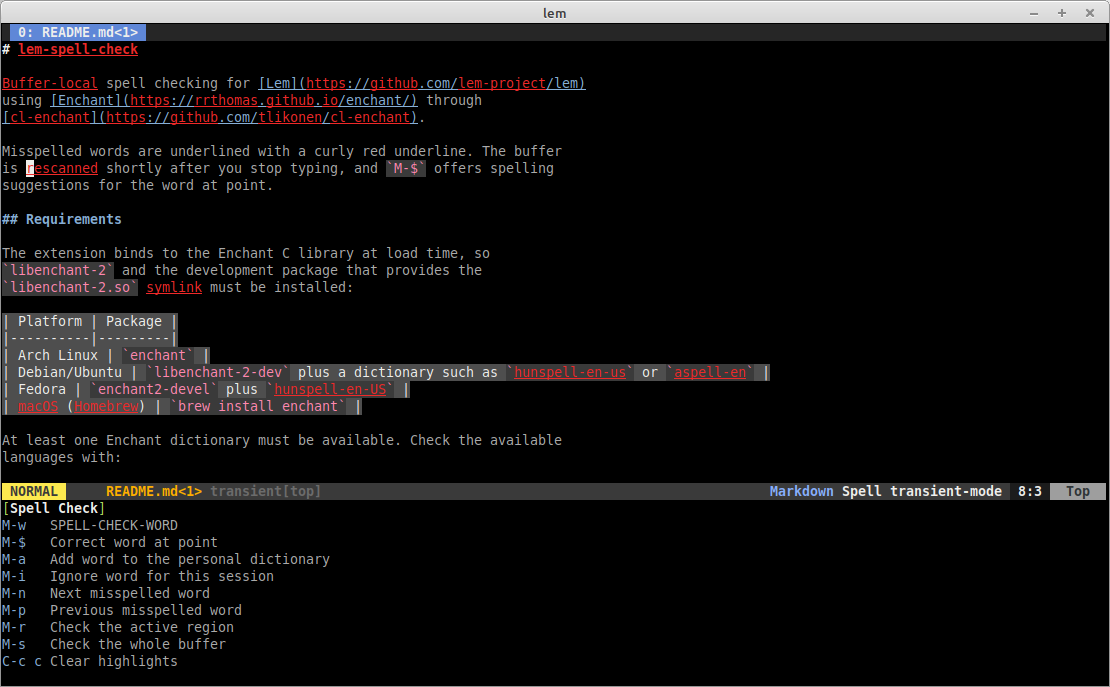
Misspelled words are underlined with a curly red underline. The buffer
is re-scanned shortly after you stop typing, and M-$ offers spelling
suggestions for the word at point.
The extension is part of the standard lem/extensions build, so it is
loaded together with Lem. Enable it per buffer:
(spell-check-mode t)
or interactively with M-x spell-check-mode. While the mode is active,
a transient popup at the bottom of the screen lists the key bindings
described below. It appears when the mode is enabled, follows the
current buffer, and disappears in buffers where the mode is off.
To enable it automatically for particular major modes:
(add-hook *markdown-mode-hook*
          (lambda () (spell-check-mode t)))
| Key / command | Description |
|---|---|
M-$ (spell-check-word) | Check the word at point and prompt for a replacement, listing all suggestions |
M-s (spell-check-buffer) | Enable the mode if needed and check the whole buffer |
M-r (spell-check-region) | Check only the active region; later rescans and corrections stay inside it |
M-n (spell-check-next-error) | Move to the next misspelled word |
M-p (spell-check-previous-error) | Move to the previous misspelled word |
M-a (spell-check-add-word) | Add the word at point to the personal dictionary |
M-i (spell-check-ignore-word) | Ignore the word for this session only |
C-c d (spell-check-change-dictionary) | Choose the dictionary for this buffer |
C-c c (spell-check-clear) | Remove the highlights until the next edit |
spell-check-region narrows all subsequent activity of the buffer’s
spell checker to the selected region: edits rescan the region,
M-$ only corrects words inside it, and spell-check-next-error
navigates the region’s misspellings. Run spell-check-buffer (or
disable spell-check-mode) to remove the restriction.
All three variables are editor variables, so they can be set globally or per buffer.
;; Default language for all buffers.
(setf (variable-value 'lem-spell-check:spell-check-language :global) "en_GB")

;; Or per buffer.
(setf (variable-value 'lem-spell-check:spell-check-language
                      :buffer (current-buffer))
      "de_DE")
spell-check-language(nilby default) — Enchant language code. Whennil, the language is derived fromLC_ALL,LC_MESSAGESorLANG(for exampleen_US.UTF-8becomesen_US), falling back to the first installed dictionary. An explicit language that Enchant does not provide raises an error.spell-check-delay(400) — idle delay in milliseconds before rescanning after an edit.spell-check-min-word-length(2) — words shorter than this are ignored.
Tokens containing digits are not checked, and words shorter than
spell-check-min-word-length are skipped. Apostrophes and hyphens are
kept inside words when followed by a letter or digit, so don't and
well-known are checked as single words.
- The whole buffer is scanned synchronously on the editor thread. This is fast for normal text (tens of milliseconds for thousands of words) but is not incremental.
- Code, URLs and markup are tokenized like prose, so identifiers and other non-words may be flagged. There is no per-major-mode filtering yet.
- Dictionaries and session-ignored words are shared per Enchant dictionary, so ignoring a word in one buffer affects every buffer using the same language.